
Obtaining the miyoushe Salt (LK2 & K2)
Obtain the miyoushe salt (LK2 & K2) by decompiling the APK
Using jadx to Obtain the Internal Encryption Salt
Variable names are randomized; map them to your own context accordingly
Open jadx and directly search for the DS or LK2 keywords || locate the a2222 variable in the com.mihoyo.hyperion.net.aaaaa or com.mihoyo.hyperion.net.bbbbb file and search for it (the image below shows that the two methods locate the same thing)
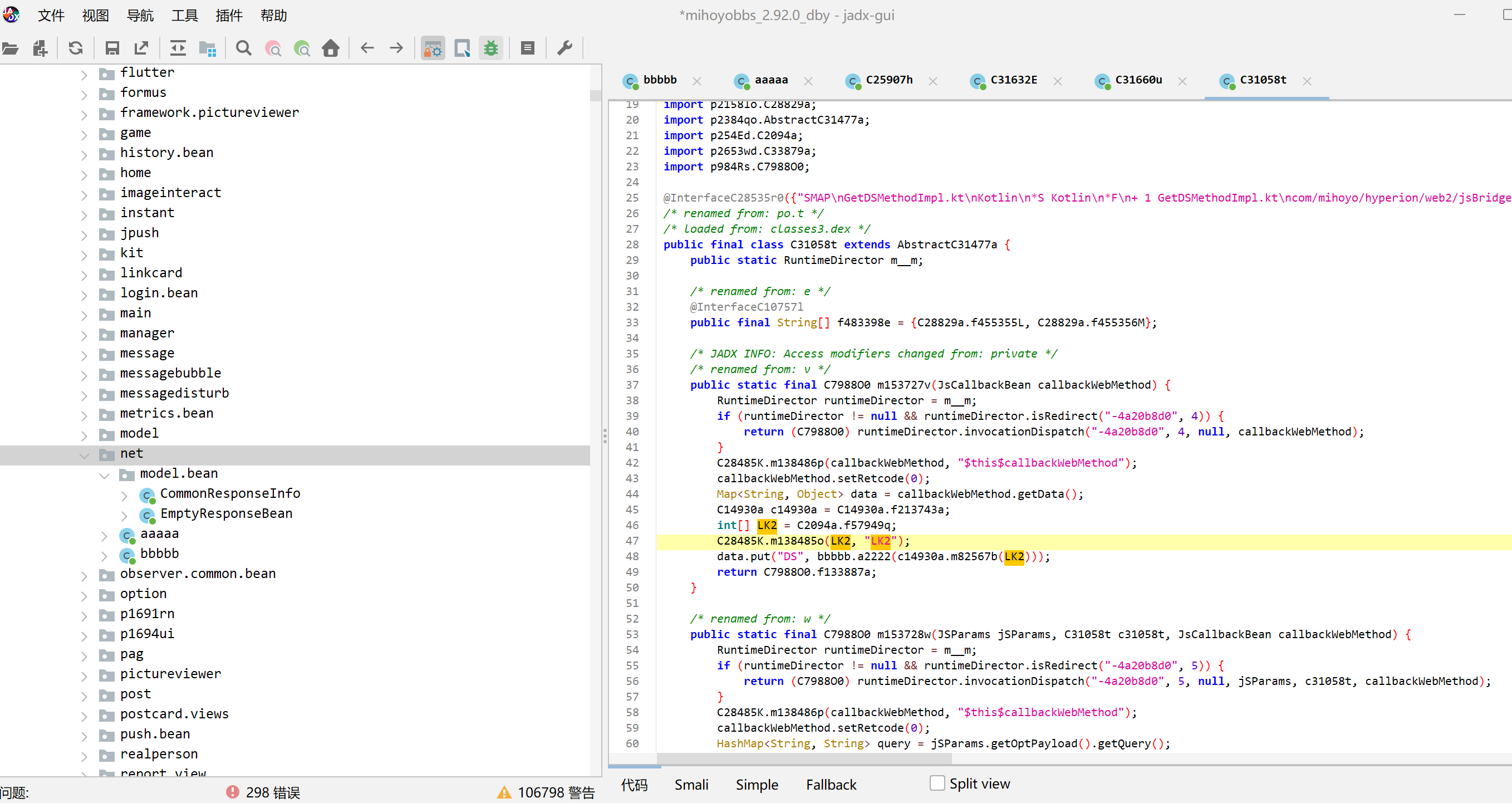
Located DS/LK2
As you can see, the LK2 variable above is defined via an int array named f57949q; double-click to locate it

Locating f57949q
Copy the values for later use (note: replace the variables with their values), for example, for version 2.92.0 here, the value is
{-74, 60, -78, 204, 96, -88, -82, 78, 162, 54, -68, 78, -84, 84, -80, 66, 216, -80, 180, 90, MediaPlayer.MEDIA_PLAYER_OPTION_ABR_AVERAGE_BITRATE, C5432a.f120322i, -74, 66, 114, -98, -116, 54, 84, 204, 204, C5432a.f120320g}Replace with
{-74, 60, -78, 204, 96, -88, -82, 78, 162, 54, -68, 78, -84, 84, -80, 66, 216, -80, 180, 90, 174, -106, -74, 66, 114, -98, -116, 54, 84, 204, 204, -104}It’s natural to wonder what the f57948p variable above f57949q does. Searching for it will locate it — it turns out to be K2
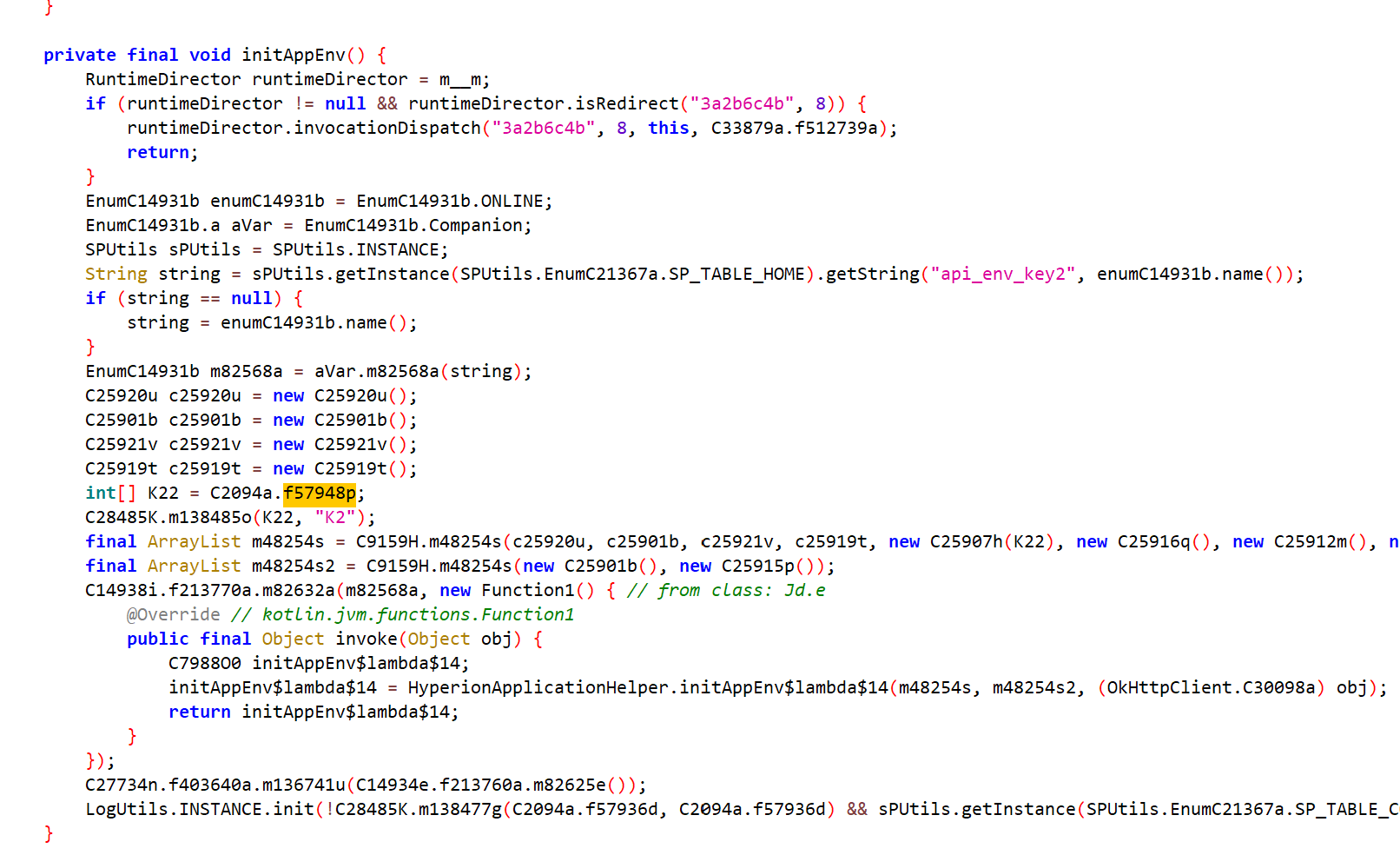
Locating f57948p
Perform the same operation, copy it for later use; the value here is
{-98, -66, 192, 120, 60, 198, 168, -68, 216, 66, 168, 126, -108, -76, 126, -82, 114, -88, -88, -122, 162, -112, -66, 180, -122, 72, 108, 180, 78, -108, -106, -116}At this point we have obtained the raw salt
Obtaining the Encryption Method
From the image above, we can see that the LK2 variable is passed into the c14930a.m82567b method; locate it directly
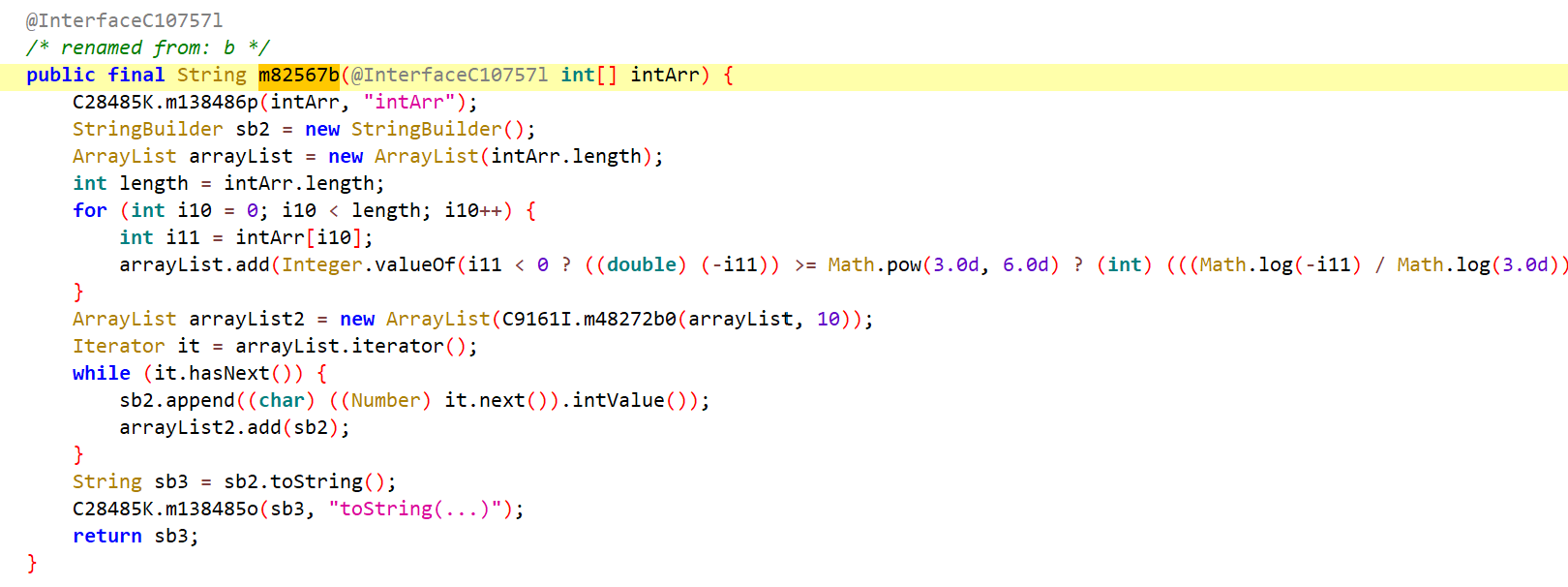
m82567b method
This is clearly an encryption method; let’s rewrite it slightly
public static String m61080b(int[] intArr) { int i12; StringBuilder sb2 = new StringBuilder(); ArrayList<Integer> arrayList = new ArrayList<>(intArr.length); for (int i13 : intArr) { if (i13 < 0) { i12 = ((double) (-i13)) >= Math.pow(3.0d, 6.0d) ? (int) (((Math.log(-i13) / Math.log(3.0d)) - 6) + 48) : ~i13; } else { i12 = (i13 / 3) + 48; } arrayList.add(i12); } for (Integer integer : arrayList) { sb2.append((char) integer.intValue()); } return sb2.toString(); }Now you only need to pass in the array to get the encrypted salt. Similarly, locate and obtain the encryption method used for the K2 variable (in fact, the two encryption methods are identical)
Conclusion
public static final int[] k2 = {-98, -66, 192, 120, 60, 198, 168, -68, 216, 66, 168, 126, -108, -76, 126, -82, 114, -88, -88, -122, 162, -112, -66, 180, -122, 72, 108, 180, 78, -108, -106, -116}; public static final int[] lk2 = {-74, 60, -78, 204, 96, -88, -82, 78, 162, 54, -68, 78, -84, 84, -80, 66, 216, -80, 180, 90, 174, -106, -74, 66, 114, -98, -116, 54, 84, 204, 204, -104}; public static void main(String[] args) { System.out.println(m61080b(k2)); System.out.println(m61080b(lk2)); }Run result:
aApXDrhCxFhZkKZQVWWyfoAlyHTlJkisIDMtPWQJfBCJSLOFxOlNjiIFVasBLttgAt this point we have obtained it
Claude Code Skill: Automated Extraction
Below is a skill for Claude Code that can automate the above locating and decoding process via jadx-mcp-server.
Usage: Save the content below as
SKILL.mdand place it in the.claude/skills/find-miyoushe-ds-salt/directory.
---name: find-miyoushe-ds-saltdescription: > Extract the DS signature parameters (K2/LK2 salt) from the miyoushe (miyoushe/hyperion) APK. Use this skill when the user asks to analyze the DS signature mechanism of miyoushe, find the K2/LK2 salt, reverse-engineer the miyoushe network request signature, or analyze the com.mihoyo.hyperion package via jadx-mcp-server. Applies to any version of the miyoushe APK; variable names differ due to obfuscation, but the logical structure remains unchanged.---
# miyoushe DS Signature Parameter Extraction Guide
## Background
The miyoushe APK uses a DS (Dynamic Signature) mechanism to sign network requests. The DS is generated by a native (JNI) method; the Java layer is responsible for assembling the parameters and injecting them into the HTTP request headers. The core parameters K2 and LK2 are int[] arrays, which are decoded into salt strings by the AManager class and then passed to the native method.
## Prerequisites
- jadx-mcp-server is started and connected to JADX-GUI- JADX-GUI has opened the target APK and decompilation is complete- Verify the connection is normal via `curl http://127.0.0.1:8650/health`
## Locating Procedure
The class names and field names in each step will vary by APK version (obfuscated renaming), but the logical structure is always consistent. Each step gives identifying characteristics; do not hardcode class names.
### Step 1: Find the native JNI wrapper class
The core DS signature implementation is in the native layer. First find the native wrapper class under the `com.mihoyo.hyperion.net` package.
> ⚠️ **Search API Caveats (Must Read)**: The `search-classes-by-keyword` endpoint with `search_in=class` splits class names by `.` and performs prefix/whole-word matching on **individual tokens**. Therefore, **any qualified package name containing `.`** (e.g., `com.mihoyo.hyperion.net`, `com.mihoyo`, `hyperion.net`) will return 0 results.> The correct approach is to use a **single token** (e.g., `mihoyo`/`hyperion`/`net`), or switch to `search_in=code` to search for code-level features.
**Recommended query (most precise, directly hits the native library load point):**
```bash# Search for System.loadLibrary in code, then filter results for com.mihoyo.hyperion.net.* classescurl -s "http://127.0.0.1:8650/search-classes-by-keyword?search_term=loadLibrary&search_in=code&offset=0&count=20"```
**Alternative query (single-token package name fragment; requires manual filtering with the `com.mihoyo.hyperion.net` prefix):**
```bashcurl -s "http://127.0.0.1:8650/search-classes-by-keyword?search_term=net&search_in=class&offset=0&count=40"```
Identifying characteristics: there are usually 2 classes in this package that meet the following conditions:
- `static { System.loadLibrary("xxx"); }` loads the native library- contains a `native` method whose parameters and return value are both `String`- the class name is extremely short (obfuscated), e.g., `aaaaa`, `bbbbb`
Record these two classes as **Class A** and **Class B** respectively. Each has a native method that accepts 1-2 String parameters and returns a String (usually with the same name, e.g., `a2222`).
### Step 2: Find the DS Interceptor (OkHttp Interceptor)
Use cross-references to find who calls these native methods.
```bash# Perform xrefs on the native signing methods of Class A and Class B respectivelycurl -s "http://127.0.0.1:8650/xrefs-to-method?class_name=<Class A full name>&method_name=<method name>&offset=0&count=20"curl -s "http://127.0.0.1:8650/xrefs-to-method?class_name=<Class B full name>&method_name=<method name>&offset=0&count=20"```
Identifying characteristics: among the xrefs there will be a class implementing `Interceptor` (OkHttp's `InterfaceC18926w`), and its `intercept` method contains `chain.proceed(...)` and the `"DS"` string.
This class is the **DS Interceptor**. However, in practice **the interceptor is often an inner class** (e.g., `hn.C33707m`), and MCP's `class-source` and `xrefs-to-class` will return "Class not found" for classes with inner-class suffixes (like `C33707m`); only `xrefs-to-method` (by method) can resolve them. Also note that **there is no `/method-source` endpoint**; do not attempt to call it.
> ✅ **Recommended programmatic approach (no manual GUI interaction needed)**: Perform `xrefs-to-method` on the native method to find the **caller** (typically an Application initialization class like `xxx.app.xxxApplicationHelper`), then read the **caller's** `class-source` (which can be fetched normally). Search within it for `new <InterceptorClass>(K22)` / `int[] K22 = ...` to reverse-trace the salt array. This bypasses the issue of being unable to fetch the interceptor source code directly.
Fallback (when the caller source is also unavailable): manually open the interceptor class in JADX-GUI, then read it via the `current-class` API:
```bashcurl -s "http://127.0.0.1:8650/current-class"```
### Step 3: Analyze the DS Interceptor Logic
From the interceptor's `intercept` method you can see:
1. **DS type determination**: decide whether to use DS1 or DS2 based on the request tag or path2. **DS1 path**: call a native method, passing in a salt string3. **DS2 path**: call another native method, passing in the request body and query string4. **salt source**: the salt is decoded from an `int[]` array by some manager class
Key code pattern:
```java// DS2 path (special requests)if (isDS2) { ds = nativeMethod2(requestBody, queryString);} else { // DS1 path (normal requests) ds = nativeMethod1(manager.decode(intArray));}chain.proceed(request.addHeader("DS", ds).build());```
### Step 4: Find Where the Salt Array Is Defined
Prefer the "programmatic approach" from Step 2: read the interceptor **caller's** `class-source` and search for `new <Interceptor>(K22)` to locate the salt array. If you insist on using xrefs, note that `xrefs-to-class` may also return "not found" for inner-class interceptors:
```bashcurl -s "http://127.0.0.1:8650/xrefs-to-class?class_name=<DS interceptor class name>&offset=0&count=20"```
> ⚠️ **K2/LK2 are NOT necessarily in BuildConfig**: `com.mihoyo.hyperion.utils.BuildConfig` is just a standard Gradle artifact (containing only `BUILD_TYPE`, etc.). The two `int[]` arrays actually reside in a different class (e.g., `p232Df.C1989a`). Do not hardcode "find BuildConfig"; instead, look for **a class containing two adjacent `public static final int[]` static fields**, with obfuscated field names (e.g., `f37869p`/`f37870q`). The order is fixed: upper = **K2**, lower = **LK2**.
Identifying characteristics: instantiation usually happens in the Application initialization method (such as `initAppEnv` or similar name). Look for code like:
```javaint[] K22 = SomeClass.K2_FIELD; // Upper field = K2new DSInterceptor(K22);// Same class also contains LK2_FIELD = LK2 below```
Record the two `int[]` fields of that class (names are obfuscated). Usually the two array fields are defined adjacent to each other; the upper one is **K2** and the lower one is **LK2** (the order is fixed). You can cross-confirm using the JS Bridge class from Step 5.
If the class is accessible via the API, fetch it directly:
```bashcurl -s "http://127.0.0.1:8650/class-source?class_name=<salt array class name>"```
### Step 5: Confirm the Correspondence Between K2 and LK2
Find another place that uses these arrays via xrefs or search. `GetDSMethodImpl` (the JS Bridge implementation) uses LK2, which can be confirmed by searching for the array references within it:
```bash# Search for classes containing both native method names (typically the JS Bridge)curl -s "http://127.0.0.1:8650/search-classes-by-keyword?search_term=getDS&search_in=code&offset=0&count=10"```
That class will contain code like this to explicitly identify LK2:
```javaint[] LK2 = SomeClass.LK2_FIELD; // Same class as in Step 4data.put("DS", nativeMethod(manager.decode(LK2)));```
### Step 6: Decode the Salt
Find the `AManager` class (a utility class responsible for decoding `int[]` into String).
Identifying characteristics:- the package name is usually under the bn package- contains two methods with identical parameters and return values (one for K2, one for LK2)- method logic: iterate over the int array, apply a mathematical operation to each element to convert it to a char
Decode algorithm (unchanged across versions):```javascriptfunction decodeSalt(intArr) { return intArr.map(x => { if (x < 0) { return Math.abs(x) >= 729 ? String.fromCharCode(Math.floor(Math.log(-x) / Math.log(3) - 6 + 48)) : String.fromCharCode(~x); } return String.fromCharCode(Math.floor(x / 3) + 48); }).join('');}```
Execute directly:```bashnode -e "const k2 = [<K2 array values>];const lk2 = [<LK2 array values>];function d(a){return a.map(x=>x<0?Math.abs(x)>=729?String.fromCharCode(Math.floor(Math.log(-x)/Math.log(3)-6+48)):String.fromCharCode(~x):String.fromCharCode(Math.floor(x/3)+48)).join('');}console.log('K2 salt:', d(k2));console.log('LK2 salt:', d(lk2));"```
## Version Differences
| Element | Changes? | Description || :-------------------------- | :--------- | :--------------------------------------------------------------------------------------------------------------------------------------- || Package structure | No | `com.mihoyo.hyperion.net` always exists || Native wrapper class name | Yes | Obfuscated to short names, e.g., `aaaaa`/`bbbbb` || Native method name | Yes | Obfuscated to short names, e.g., `a2222`/`b5555` || Native library name | Yes | Obfuscated to short names, e.g., `libdddd.so` || DS interceptor class name | Yes | Obfuscated, but always implements the Interceptor interface || Salt array host class name | Yes | Package/class name is obfuscated, and it is **NOT necessarily BuildConfig** (tested in `p232Df.C1989a` for this version); always contains two adjacent `int[]` fields || K2/LK2 array values | **Yes** | Each version has a different salt || AManager decode algorithm | No | Mathematical logic is fixed || DS header name | No | Always `"DS"` || DS1/DS2 determination logic | No | Determined by tag or path |
## Quick Reference
The complete call chain of DS generation:```OkHttp request → DS interceptor.intercept() ├─ DS2: nativeMethod(body, query) → encrypt signature └─ DS1: nativeMethod(AManager.decode(K2/LK2)) → encrypt signature └─ int[] → decode algorithm → salt stringFinal: request.addHeader("DS", signature value)```
K2 is used by the main API interceptor, and LK2 is used by the WebView JS Bridge's `getDS` method. The decoding method for both is exactly the same; only the application scenario differs.